Loading ski race…

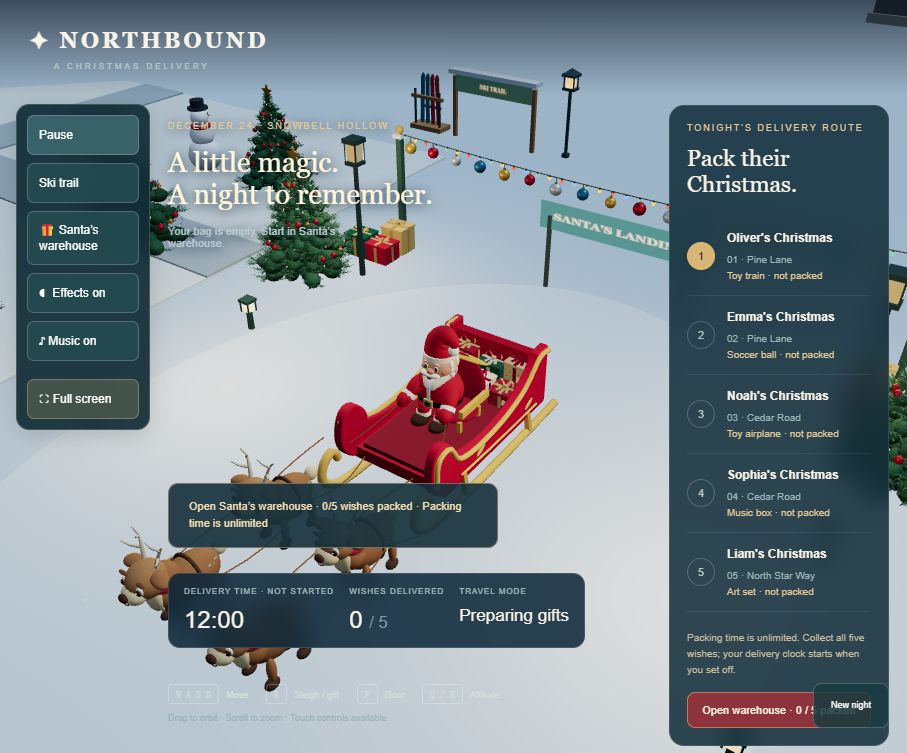
Santa and his reindeer sleigh in Snowbell Hollow

Explore Snowbell Hollow

Pack five Christmas wishes, fly Santa’s sleigh and deliver presents to the families in town.

Explore the player guide, or start your free 3D Christmas delivery adventure.

Read the player guide ↓
✦ NORTHBOUNDSanta Game Online3D PLAYABLE PROTOTYPE
DECEMBER 24 · SNOWBELL HOLLOW

Santa is ready. Pack five wishes in the warehouse.

DELIVERY TIME · NOT STARTED12:00
WISHES DELIVERED0 / 5
TRAVEL MODESleigh flight
WASD to fly · Q / R to descend / climb
W A S D Move E Sleigh / gift F Door Q / R Altitude
Drag to orbit · Scroll to zoom · Touch controls available
A WISH UNDER THE TREE

CHRISTMAS MORNING

TONIGHT’S FIVE WISHES

0 / 5 packed

Take your time. The clock starts after departure.

SNOWBELL LANTERN TRAIL

Choose your ski race.

Pick a trail and a race mode to go straight to the start line.

Single-player race: control Santa with WASD or the arrow keys. Holly starts automatically after the countdown and races as your computer opponent.

Two-player race uses a split screen. Player 1 uses WASD and Player 2 uses the arrow keys. Collect the gift goal, then finish first. Each racer has a separate set of gifts.

Your town delivery clock pauses while you are skiing.

NORTHBOUND · PLAYER GUIDE

How to play the 3D Santa game

Become Santa Claus for a Christmas Eve delivery trip around Snowbell Hollow. You will collect toys from a gift warehouse, fly a reindeer sleigh to five families, and walk inside their homes to leave each present under a Christmas tree. The delivery story is single-player, with optional local two-player split-screen ski racing on one keyboard. There is no online multiplayer or leaderboard.

Pack, fly and deliver

  1. Read tonight’s wishes. Open Santa’s warehouse from the controls menu. The checklist names the five children and the toys they want. Your delivery bag starts empty, and there is no time limit while you prepare.
  2. Collect the matching toys. Look on the labelled shelves and around the Christmas tree. Walk up to a matching gift and use E or the Pack nearest gift button. Check that all five wishes are marked as packed, then return to the sleigh.
  3. Set off for town. Use R or Rise to take off. Your twelve-minute delivery clock starts after you finish packing and depart. Follow the active address and approach its landing circle. Use Q or Lower to descend.
  4. Walk to the front door. When you have landed near the house, use E or Sleigh / gift to get out. Walk through the gate and approach the entrance. Use F or Door to enter when the prompt appears.
  5. Leave the right present. Approach the Christmas tree and use the gift interaction to read the child’s wish. Choose the matching toy from your bag and check the feedback. You can correct a mistaken choice, although it affects your result.
  6. Continue your route. Return to the door, use the Door action to leave, and board the sleigh near your parking spot. Deliver all five presents before the clock runs out. Pause is available when you need a break.

Keyboard, mouse and touch controls

Use W A S D to move; Q / R to lower or raise the sleigh; E for sleigh and gift actions; F for doors; and C to sit or stand aboard. Drag to look around and use the mouse wheel to zoom. Watch the prompt for the action available at your current position.

On a phone or tablet, use the on-screen movement and action buttons. Open Controls for the warehouse, ski trail and display options. Landscape orientation gives the controls more room. This is a 3D prototype, so speed and touch control layout may vary by device and browser.

Race Holly or a friend down the ski trail

Choose Ski trail, pick a trail and select Single-player race · Vs Holly or Two-player race · Same keyboard. You go straight to the start line. The play buttons on the ski guides also take you there. Click Start race to begin the three-second countdown and enable your selected music. Use the Music button to turn it off or back on.

In single-player racing, you control Santa with WASD or the arrow keys and Holly races independently as your computer opponent. Use W or the up arrow to push off, steer left or right, and use S, the down arrow or Space to brake. In two-player racing, Santa uses WASD and Holly uses the arrow keys on the same keyboard. Each racer collects a separate set of gifts. Collect at least 12 gifts in Level 1, then reach the finish before your opponent. Choose Start Level 2 on the results panel to enter Aurora Canyon, where each racer needs 18 gifts. Use Pause if you need a break: Holly keeps racing when you simply stop pushing off.

Drag across the game to rotate the view 360° around your skier, including the front. Release to keep that angle; double-click to return behind the skier. In split screen, drag within the view you want to rotate.

Your town delivery clock pauses during skiing. Return to town to continue your original delivery route. The ski race uses its own elapsed time and gift totals; trail gifts do not replace the five families’ presents. There is no online multiplayer or leaderboard.

Santa ski game guide · Two player Christmas race

Santa Game Online is a free playable prototype: no account, purchase or separate installation is needed. New night starts a fresh attempt after confirmation, so use it when you want to begin again.

What gifts do the five families want?

The five stops are Oliver at 01 Pine Lane, Emma at 02 Pine Lane, Noah at 03 Cedar Road, Sophia at 04 Cedar Road, and Liam at 05 North Star Way. Their addresses stay the same, but their requested presents are shuffled when a new game loads. A guide cannot give you a permanent answer such as Oliver always wanting a train. Read the current route list before collecting anything, and check the wish shown inside each home before choosing a gift.

The gift catalogue contains a toy train, teddy bear, art set, robot, building blocks, soccer ball, toy airplane and music box. Five different gifts from that catalogue are assigned to the five children for the current run. Match the printed gift name on the warehouse shelf to the name beside the child in your checklist. Colours and box shapes help decorate the warehouse, but they are not a substitute for the labels. You do not need to pack every toy on every shelf.

Before departure, check all five rows rather than relying only on your memory. Each requested toy should be marked packed. During delivery, choose the matching gift from your bag and wait for confirmation before leaving the tree. A wrong selection can be corrected, but it counts against delivery accuracy. The gifts collected during ski races are separate from the town deliveries; they do not replace the presents on the town list. Starting New night gives you another attempt, so read the wishes again instead of assuming the previous assignments still apply.

How to plan a twelve-minute delivery route

Use the unlimited warehouse preparation period to learn movement, read every wish and locate your sleigh. None of that needs to consume delivery time. Once all five gifts are packed and you depart from the landing, the twelve-minute clock begins. A useful first-run budget is roughly two minutes per household, leaving about two minutes overall for finding an entrance, correcting a landing or recovering from a mistaken turn. This is a planning suggestion, not a separate timer or a guarantee.

Follow the displayed order from Pine Lane through Cedar Road to North Star Way while learning the town. At each stop, think through the entire visit: descend near the entrance, leave space beside the gate, get out with E, enter with F, approach the tree, choose the gift, then leave and board again. Parking too close to a fence can make the walking part awkward even when the flight was quick. Keep your camera far enough back to see both Santa and the path.

After the first two homes, glance at the delivered count and remaining time. If you are behind your suggested budget, simplify the next approach rather than rushing the gift choice. Avoid unnecessary altitude changes and use the active address to orient yourself before takeoff. If you want to inspect this guide during a run, use Pause first. Skiing pauses the town timer while you are on the trail, but it does not finish the town deliveries. Return to the route when ready, or save the optional mountain trip for a later attempt.

NORTHBOUND · PLAYER GUIDE↑ Back to game

3D Santa Game: Deliver Five Christmas Wishes

How to play the 3D Santa game

Become Santa Claus for a Christmas Eve delivery trip around Snowbell Hollow. You will collect toys from a gift warehouse, fly a reindeer sleigh to five families, and walk inside their homes to leave each present under a Christmas tree. The delivery story is single-player, with optional local two-player split-screen ski racing on one keyboard. There is no online multiplayer or leaderboard.

How to plan a twelve-minute delivery route

Use the unlimited warehouse preparation period to learn movement, read every wish and locate your sleigh. None of that needs to consume delivery time. Once all five gifts are packed and you depart from the landing, the twelve-minute clock begins. A useful first-run budget is roughly two minutes per household, leaving about two minutes overall for finding an entrance, correcting a landing or recovering from a mistaken turn. This is a planning suggestion, not a separate timer or a guarantee.

Follow the displayed order from Pine Lane through Cedar Road to North Star Way while learning the town. At each stop, think through the entire visit: descend near the entrance, leave space beside the gate, get out with E, enter with F, approach the tree, choose the gift, then leave and board again. Parking too close to a fence can make the walking part awkward even when the flight was quick. Keep your camera far enough back to see both Santa and the path.

After the first two homes, glance at the delivered count and remaining time. If you are behind your suggested budget, simplify the next approach rather than rushing the gift choice. Avoid unnecessary altitude changes and use the active address to orient yourself before takeoff. If you want to inspect this guide during a run, use Pause first. Skiing pauses the town timer while you are on the trail, but it does not finish the town deliveries. Return to the route when ready, or save the optional mountain trip for a later attempt.